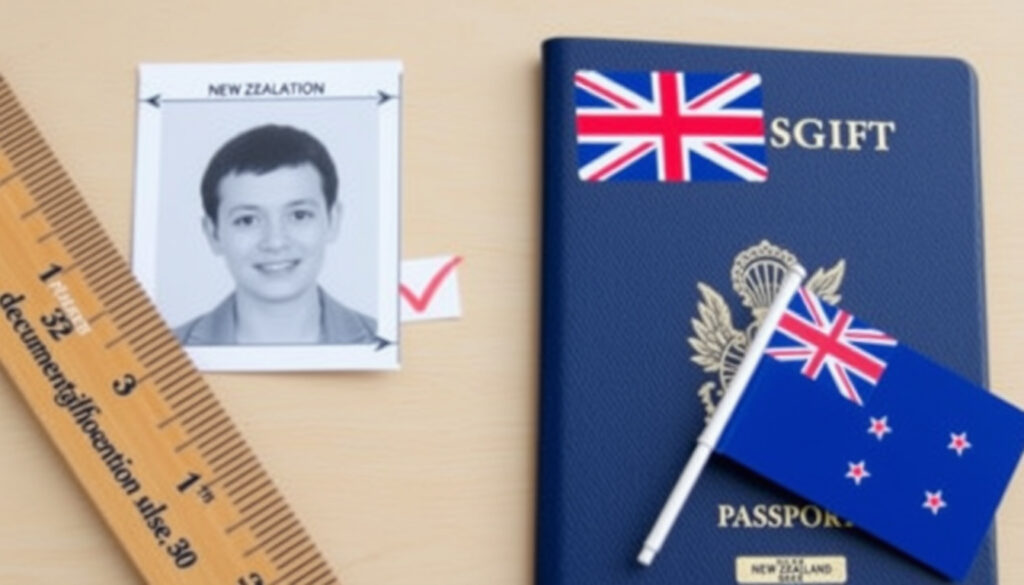
Passport Photo Requirements NZ: Size, Rules & Rejection Fix
If you’ve ever stood in front of a plain wall wondering whether your favourite white shirt will work for a New Zealand passport photo, you’re not alone. The rules are surprisingly detailed — and getting them wrong can delay your application by weeks.
Photo dimensions required: 35 mm x 45 mm ·
Digital aspect ratio: 3:4 ·
Maximum age of photo: 6 months ·
Background color: Light-coloured (not pure white) ·
File format (digital): .jpg or .jpeg
Quick snapshot
- 35 mm x 45 mm for printed applications (New Zealand Passports (official government body))
- 3:4 aspect ratio for digital submissions (New Zealand Passports (official government body))
- 1200-6000 px width, 900-4500 px height (New Zealand Passports (official government body))
- .jpg or .jpeg, 250 KB – 5 MB (New Zealand Passports (official government body))
- Neutral expression, mouth closed (New Zealand Passports (official government body))
- Eyes open and clearly visible (New Zealand Passports (official government body))
- Hair off face, no shadows (New Zealand Passports (official government body))
- No glasses glare (New Zealand Passports (official government body))
- Light-coloured background, not pure white (New Zealand Passports (official government body))
- Even lighting, no harsh shadows (New Zealand Passports (official government body))
- No patterns or objects behind (New Zealand Passports (official government body))
- White or very light clothing blending with background
- Hats (except religious or medical reasons)
- Sunglasses or tinted lenses
- Large patterns, logos, or uniforms
What are the requirements for a passport photo in NZ?
The New Zealand Passports office sets specific technical standards that every submitted photo must meet. Failure to comply means your application will be returned — and you’ll need to start over.
Size and format specifications
- Paper passport photos must be 35 mm wide by 45 mm high and printed on photo-quality paper (New Zealand Passports (official government body)).
- Digital photos require a 3:4 aspect ratio with a minimum width of 900 pixels and minimum height of 1200 pixels. The maximum is 6000 pixels wide and 4500 pixels high (New Zealand Passports (official government body)).
- File format must be .jpg or .jpeg, between 250 KB and 5 MB.
- The photo must be less than 6 months old (Immigration New Zealand (official immigration authority)).
Background and lighting requirements
- Use a light-coloured background — but not pure white or dark (New Zealand Passports (official government body)).
- Lighting must be even, with no harsh shadows on the face or behind you.
- No objects, patterns, or other people should be visible in the background.
Expression and head position
- A neutral expression is required — mouth closed, no visible teeth (New Zealand Passports (official government body)).
- Both eyes must be open and clearly visible.
- Your head should be centred and facing the camera directly.
The New Zealand Passports office warns that photos taken too close can distort facial proportions, making the nose and forehead appear larger and the ears less visible (New Zealand Passports (official government body)). Keep at least arm’s length.
The implication: a photo that looks fine to you may fail automated checks. The safest bet is to follow every dimension to the exact pixel.
What should you not wear for a passport photo?
Your clothing choices directly affect whether your photo passes. The New Zealand Passports office flags several items you should leave out of the frame.
Colors to avoid
- White or very light colours that blend into the light-coloured background (New Zealand Passports (official government body)).
- Dark colours are fine, but avoid anything that creates a strong contrast with the background.
Patterns and reflective items
- No large patterns, logos, or words on clothing.
- No sunglasses or tinted glasses — and clear prescription glasses must not cause glare (Immigration New Zealand (official immigration authority)).
Headwear and accessories
- No hats or head coverings unless worn for religious or medical reasons, and they must not obscure any part of the face (New Zealand Passports (official government body)).
- No headbands, hair clips, or other accessories that cast shadows on the face.
A white shirt against a light-coloured background creates virtually no separation between you and the wall. Immigration New Zealand says this is one of the most common clothing-related rejection causes (Immigration New Zealand (official immigration authority)).
The trade-off: you want clothing that contrasts with the background but doesn’t dominate the frame — a medium-toned top is the safest choice.
Can I smile in a passport photo in NZ?
The short answer is no — at least, not in a way that shows teeth or changes your resting facial shape.
Facial expression rules
- A neutral expression is mandatory: no smiling, no frowning, no raised eyebrows (New Zealand Passports (official government body)).
- Your mouth must be closed — teeth should not be visible.
- Both eyes must be clearly visible and open.
Exceptions for specific applicants
- Babies and young children may show a slight smile if it doesn’t distort the face, but the same neutral standard applies wherever possible.
- No exceptions for adults — a neutral expression is enforced equally for all applicants aged 5 and over.
Immigration New Zealand states that AI-enhanced or digitally altered photos do not meet its standards (Immigration New Zealand (official immigration authority)). Even a subtle smile can be considered “altering” your natural appearance.
The pattern: the rule exists because automated face-matching systems need consistent, expressionless features to match your photo against existing records. A smile — even a small one — reduces match accuracy.
Do I have to put my hair behind my ears for a passport photo?
No — but your face must be fully visible. Here’s how the rule works in practice.
Hair position rules
- Your hair must not obscure any part of your face or eyes (New Zealand Passports (official government body)).
- Bangs are allowed as long as they do not cover your eyebrows or eyes.
- There is no requirement to put hair behind your ears provided your face remains clear.
Up or down styles
- Both up and down styles are acceptable — the rule is about visibility, not style.
- If hair falls forward and casts shadows on the cheeks or eyes, adjust it before taking the photo.
The implication: a ponytail or low bun keeps hair away from the face and reduces shadow risk, but it’s not mandatory. What matters is that every outline of your face — from temple to jaw to chin — is unobstructed.
What are common reasons passport photos get rejected?
Knowing why photos fail helps you avoid the same mistakes. Here are the most frequent rejection triggers, drawn directly from official guidance.
Image quality issues
- Photo too old — more than 6 months old results in automatic rejection (Immigration New Zealand (official immigration authority)).
- Wrong dimensions or aspect ratio — 35 mm x 45 mm for print, 3:4 for digital.
- Low resolution — below 900 x 1200 pixels for digital submissions.
- File too large or too small — must be between 250 KB and 5 MB.
Posing and background errors
- Improper background — too dark, too white, or has a busy pattern behind you (New Zealand Passports (official government body)).
- Glare on glasses — even clear prescription lenses can reflect light and cause a rejection.
- Shadows on the face — from overhead lighting, hair, or a hat.
Clothing and accessory violations
- Smiling or non-neutral expression — the most common pose-related rejection (New Zealand Passports (official government body)).
- Hair covering eyes or the edge of the face — blocks facial recognition.
- Wearing sunglasses or tinted lenses — not permitted under any circumstance.
- Wearing a hat or head covering without an exemption — only religious or medical reasons are accepted.
How to fix a rejected passport photo in New Zealand
If your photo gets rejected, Immigration New Zealand provides clear next steps — and the process is simpler than most people expect.
Understand why it was rejected
- When you submit online, an error message appears if the photo doesn’t meet requirements (Immigration New Zealand (official immigration authority)).
- The error message tells you exactly what’s wrong — wrong size, wrong format, expression issue, etc.
Take a new photo that fixes the error
- Re-take the photo addressing the specific error: move further from the wall, adjust lighting, or change your expression.
- Use a business that takes passport photos — Immigration New Zealand says it is more likely your photo will be accepted if a professional service is used (Immigration New Zealand (official immigration authority)).
Re-upload the corrected photo
- Log back into your application and upload the new photo.
- If the rejection was for a printed application, mail two new identical prints to the passport office (New Zealand Passports (official government body)).
The catch: Immigration New Zealand says it may ask for a new photo even after submission if the original fails quality checks later in the process (Immigration New Zealand (official immigration authority)). Prevention is faster than correction.
Step-by-step guide: How to take a compliant passport photo at home in New Zealand
You don’t need a professional studio — but you do need to follow each step carefully. Here’s how to get a photo that meets official standards without leaving your house.
- Set up your space. Find a light-coloured wall — light grey, beige, or pale blue are ideal. Not white, not dark. Position yourself about 1-2 metres from the wall to avoid shadows. Place your camera or phone at eye level on a stable surface or tripod.
- Prepare yourself. Wear medium-toned clothing — avoid white, very light colours, large patterns, logos, or uniforms (New Zealand Passports (official government body)). Remove any glasses unless you need them for daily vision — if you keep them on, ensure no glare. Brush hair away from your face so your forehead, eyes, cheeks, and chin are visible.
- Take the photo. Have someone else take it — selfies are not accepted for passport or visa applications (New Zealand Passports (official government body)). The only exception is the NZeTA mobile app. Look directly at the camera with a neutral expression, mouth closed, eyes open. Ensure your head is centred and facing forward — no tilting.
- Check and submit. Verify the photo meets all digital specs: 3:4 aspect ratio, minimum 900×1200 pixels, .jpg/.jpeg, between 250 KB and 5 MB. If submitting for a paper application, print two identical copies at 35 mm x 45 mm on photo-quality paper. Submit online via the New Zealand Passports (official government body) website or via the Immigration New Zealand portal.
“You can choose to have your passport photo taken by a professional passport photo service, or you can take one yourself using your own device.”
— New Zealand Passports, official passport photo guidance (New Zealand Passports (official government body))
“If a photo does not meet our standards, we will contact you and ask you to provide a new photo. Your application may be delayed or could be declined.”
— Immigration New Zealand, visa and NZeTA photo requirements (Immigration New Zealand (official immigration authority))
x7cpr.com, visafoto.com, photoaid.com, passport-photo-software.com, immigration.govt.nz
Frequently asked questions
Can I use a photo I took at a photo booth for my NZ passport?
Yes — as long as the photo meets all the official specifications. Photo booth prints are often 35 mm x 45 mm, but check the resolution and ensure the background and expression are correct. Immigration New Zealand notes that photos taken by a professional service are more likely to be accepted (Immigration New Zealand (official immigration authority)).
Do I need a new photo every time I renew my passport?
Yes — every new passport application requires a fresh photo taken within the last 6 months. You cannot reuse a previous photo, even if it still looks like you (New Zealand Passports (official government body)).
How long does it take to get a passport photo approved?
If you submit online, the system checks the photo automatically within seconds. If it passes, your application proceeds. If it fails, you’ll see an error message immediately (Immigration New Zealand (official immigration authority)).
Can I retouch or edit my passport photo?
No. Immigration New Zealand explicitly states that AI-enhanced or digitally altered photos do not meet its standards (Immigration New Zealand (official immigration authority)). Minor brightness or contrast adjustments that don’t change your features may be acceptable, but avoid any editing that alters your appearance.
What if my baby needs a passport photo?
Babies and young children follow the same size and format rules: 35 mm x 45 mm for print, 3:4 aspect ratio for digital. The expression rule is slightly relaxed — a slight smile is allowed if the child is too young to maintain a neutral expression (New Zealand Passports (official government body)).
Are digital photos acceptable for all NZ passport applications?
Yes — online applications require a digital photo uploaded during the process. Paper applications require two identical printed photos at 35 mm x 45 mm (New Zealand Passports (official government body)).
What should I do if my photo is rejected?
Read the error message carefully, take a new photo addressing the specific issue, and re-upload it. For paper applications, mail two new prints. Immigration New Zealand says it will contact you and ask for a new photo if one is needed (Immigration New Zealand (official immigration authority)).
Can I submit a selfie for my NZ passport?
No — selfies are not accepted for passport applications. The New Zealand Passports office specifically warns against them (New Zealand Passports (official government body)). The only exception is the NZeTA mobile app, where a selfie taken within the app is permitted (Immigration New Zealand (official immigration authority)).
For anyone in New Zealand applying for a passport or visa, the choice is clear: invest 15 minutes to get the photo right the first time, or risk weeks of delay. The official specifications aren’t negotiable — but they are straightforward when you know exactly what to look for.
More related posts
 How Old Is Madonna in 2025? Age and Life Facts
 Khmer Satay Noodle House: Christchurch Menu, Reviews & Info
 Shampoo for Dry Scalp: Causes, Treatments & Best Products
 Student Loan Interest Rate NZ 2026: Rates, Repayment & Write-Off
 When Is Cyber Monday? 2025 Date & Black Friday Guide
 Lee Kum Kee Sauces: Best Types, Reviews & Tesco Deals
 How to Start a Business: Step-by-Step Guide
 Bali Currency to NZD: Exchange Rate & Travel Money Guide 2025